Your AI systems.
Your rules.
Your call.
Praetor sits between your application and every AI provider you use. It enforces your policies, protects sensitive data before it leaves the device, flags anything that needs a human decision, and keeps a permanent record of everything that happened.
Calling an AI API is not the same as controlling it.
Your team deploys an AI system. It works. Three months later, someone asks what data was sent to the model last Tuesday, why a particular response was generated, and who had the authority to approve it. You have no answer to any of those questions.
AI providers give you a capable model behind an API. They do not give you visibility into what your applications are sending, policy enforcment, or an audit trail that belongs to you.
That infrastructure has to come from your side. Praetor is that infrastructure.
Real situations this prevents
An engineer uses ChatGPT to process customer records. No one knows the data left the organization until a complaint arrives weeks later.
An AI-assisted decision is disputed. The only evidence is that an API call returned 200. No record of what was sent, what was returned, or what policy applied.
Three teams are using different AI tools. None of them are registered anywhere. No one has reviewed what they do or what data they handle.
An AI system makes high-stakes recommendations. There is no step where a qualified person reviews the output before it influences a decision.
Full control at the network level.
Zero changes to your code.
Praetor intercepts AI traffic before it reaches the provider. Your application keeps calling the same endpoints. Every governance control runs transparently in between.
Your rules.
Enforced on every request.
Nothing is blocked by default. Praetor evaluates your active policies against each request and takes the action your rules specify.
Request classified
An ML model maps the request to one of 17 use case categories covering regulated AI domains: employment management, credit & insurance risk, medical diagnosis, biometric surveillance, synthetic media, and more.
Active policies evaluated
All policies assigned to your tenant are evaluated against the detected use case. Policies can inherit from base policies and override rules at any level.
Outcome determined
The highest-severity matching rule wins. The request is allowed, flagged for review, or blocked outright depending on what your policy says.
Everything logged
The request, detected use case, matched policies, outcome, and any reviewer decision are all written to an immutable audit record before the response is delivered.
Example policy
EUPolicies are fully configurable. Each use case can be set to Allow, Block, or High Risk.
Every category we detect.
You decide what happens to each one.
An ML classifier maps every request to a use case. None of them have a fixed outcome — your policy decides Allow, Block, or High Risk for each, independently.
| Category | What it covers |
|---|---|
| Biometric Surveillance | Identifying or tracking people from biometric data — face, gait, voice — in public or semi-public spaces |
| Social Scoring | Ranking people by behavior or traits, then treating them differently based on the score |
| Subliminal / Manipulative Techniques | Nudging someone's behavior through tactics they're not consciously aware of |
| Exploitation of Vulnerabilities | Targeting people because of age, disability, or financial hardship to steer a decision |
| Emotion Recognition at Work/School | Reading an employee's or student's emotional state during work or class |
| Democratic & Electoral Processes | Anything that could sway how people vote or how an election plays out |
| Employment & Worker Management | Hiring, evaluating, promoting, or firing — AI anywhere in the employee lifecycle |
| Education & Vocational Training | Admissions, grading, and other decisions that shape a student's path |
| Law Enforcement | Profiling, risk scoring, or investigative work used by police or security teams |
| Migration, Asylum & Border Control | Visa, asylum, or border decisions where AI plays a role |
| Administration of Justice | Anything touching a court outcome — sentencing support, legal research, case prep |
| Public Services & Benefits Eligibility | Deciding who qualifies for housing, welfare, or other public benefits |
| Credit, Insurance & Financial Risk | Loan approvals, credit scoring, insurance pricing — anywhere AI moves a money decision |
| Medical Diagnosis & Clinical Support | AI that helps diagnose, recommend treatment, or support a clinical call |
| Critical Infrastructure Management | AI with a hand on energy, water, or transport systems people depend on |
| Synthetic Media & Deepfakes | AI-generated audio, video, or images that could pass for real |
| General / Other | Doesn't fit anywhere else — the default when nothing more specific applies |
Every request passes through 7 steps.
In this order. Every time.
Each step runs before the request leaves your infrastructure. The pipeline is the same whether traffic arrives via API proxy or Desktop Client.
Sensitive data replaced
before leaving the device.
In Desktop Client mode, the PII protection layer runs entirely on the end user's machine. Presidio detects personal and sensitive data using ML-based named entity recognition combined with pattern matching, then replaces every match with a structured token before the request leaves the device.
Beyond pattern matching. Most tools only catch what fits a fixed pattern, such as an email, a card number, or a national ID. Praetor also detects PII by meaning: names, places and organizations are recognized in context, even when they follow no template.
Quasi-identifier detection (GDPR Recital 26). A dedicated XLM-RoBERTa classifier flags sentences that contain no explicit identifier yet could still single someone out in combination. Take "a 34-year-old man, the only dentist in a small town near Niš." No email, no ID, nothing a regex would catch, yet it is enough to re-identify a person. This is the layer almost every other PII tool misses.
The original values live in memory only. They are never written to disk, never sent to our servers, and never seen by the AI provider. When the response comes back, the Desktop Client restores the originals locally. The user sees real data. No one else ever did.
In API proxy mode, anonymization runs on the gateway with the same Presidio stack. The reversal map is stored in Redis and applied to the response before it leaves the gateway.
Every AI tool your team uses.
Registered and governed.
Before Praetor lets any AI traffic through, it checks whether the system making the request is registered in your AI inventory. You register each AI system with its declared use case, provider, and oversight requirements.
The first time an unregistered tool sends a request, Praetor detects it, blocks it, and automatically creates a Shadow AI record in your inventory. An admin reviews it, configures the governance settings, and activates it. Until then, no traffic passes.
Each registered system can have response oversight enabled independently. For a system handling medical advice or legal analysis, you can require a reviewer to approve every AI response before it reaches the user.
The request waits.
Your reviewer decides.
When a policy flags a request for human review, Praetor does not pass it through or drop it. The connection stays open. The user is waiting. Your reviewer gets a real-time notification.
The reviewer sees the anonymized prompt, the detected use case, the violation codes, and the AI system that made the request. They approve, reject, or modify the request. The connection held open for up to 30 minutes is released with the decision applied.
The same mechanism applies to responses. For AI systems with response oversight enabled, the model's output is intercepted after generation. The reviewer reads it, can edit it, and approves before it reaches the end user.
Every review decision is logged with the reviewer's identity, their note, and a timestamp. A signed compliance certificate is generated automatically.
Policy flags the request
A use case matches a rule with RequiresHumanReview severity. Outcome is set to Pending Review.
Connection held open
The request is written to the review queue and the gateway holds the TCP connection. The user's application is waiting for a response.
Reviewer notified
Real-time push notification sent. Reviewer sees the anonymized prompt, use case, violation codes, and AI system details.
Decision applied
Approve: request continues to the provider. Reject: 451 returned to the application. The decision, reviewer identity, and note are logged permanently.
Certificate issued
A signed compliance certificate with a chain hash is generated for every reviewed decision. Exportable as PDF.
What Praetor handles.
What it does not.
Praetor handles the technical controls. What requires human judgment, legal review, or organizational process still requires exactly that.
| Capability | How it works | Status |
|---|---|---|
| Block requests that should not reach a model | Policy enforcement middleware intercepts and returns 451 before the request is forwarded | Covered |
| Human review before the model responds | Review queue holds the connection; reviewer approves or rejects; decision logged | Covered |
| Human review of the model's response before delivery | Response oversight middleware intercepts the reply; reviewer can edit before approving | Covered |
| Immutable audit trail for every request | Audit entry written before request leaves; includes prompt, use case, outcome, reviewer | Covered |
| PII protection before data reaches the provider | Presidio anonymization on-device (Desktop Client) or on-gateway (API proxy), with token restoration on response | Covered |
| Prompt injection detection | ML classifier scores every prompt; high-confidence detections flagged or escalated per policy | Covered |
| Shadow AI discovery and blocking | Unregistered AI systems are blocked automatically and surfaced in the AI inventory for review | Covered |
| Compliance certificates with chain of custody | Signed PDF certificate generated per reviewed decision; chain hash links to previous certificate | Covered |
| Export of audit records and AI system inventory | PDF and Excel export with date range filtering | Covered |
| Per-system risk assessment documentation | Structured assessment module with reviewer workflow, PDF export, and immutable submission record | Partial |
| Regulatory compliance certification | Praetor provides the technical controls and evidence layer. Legal obligations, organizational decisions, and formal certification require your team's expertise. | Partial |
"Partial" means Praetor gives your team the tooling and evidence. The organizational decisions and formal documentation that only your team can author remain yours.
Production-grade from the start.
Every screen. Taken today.
Real screenshots from a live Praetor instance. No mockups, no redesigns.
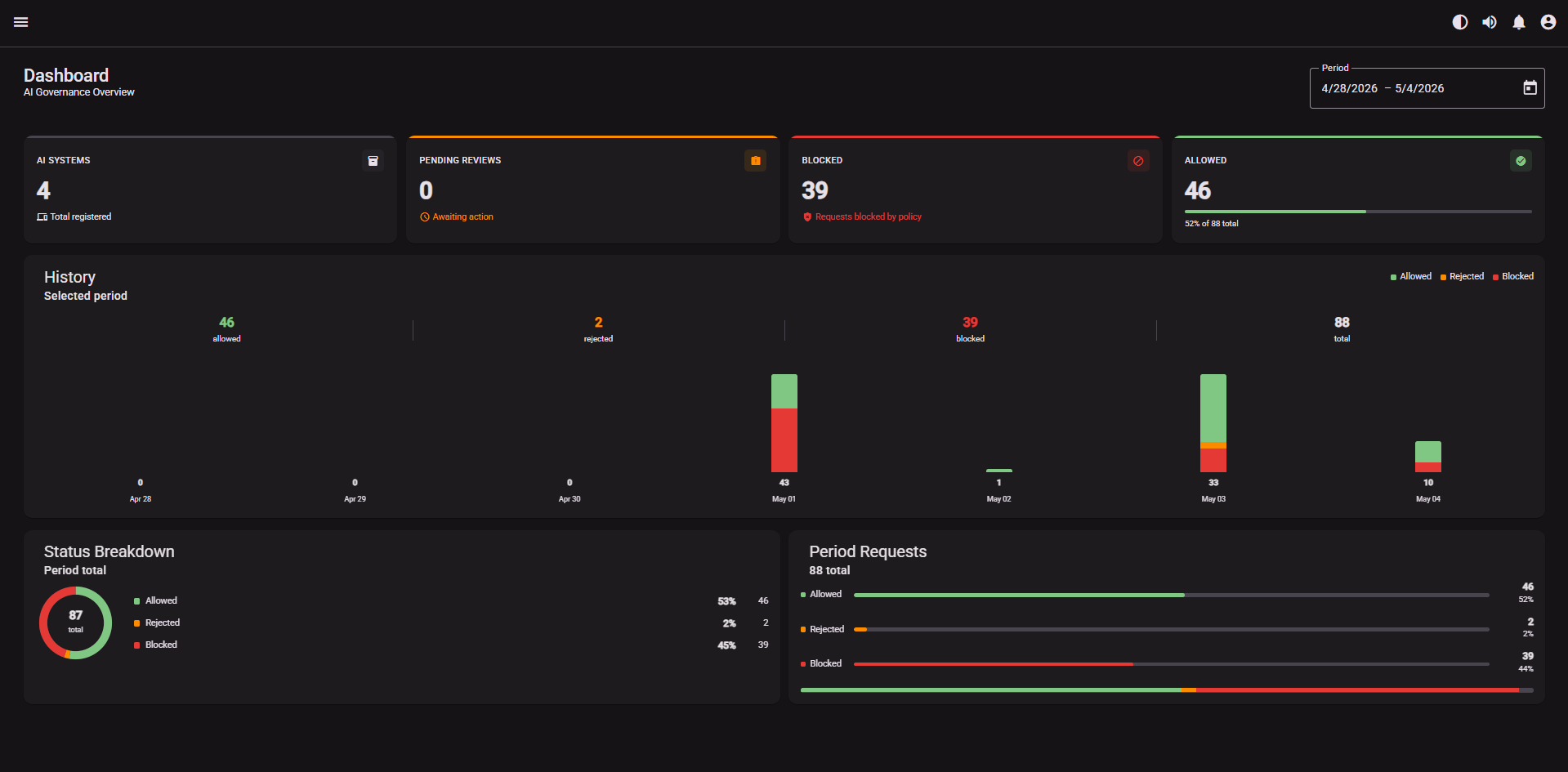
Dashboard: live count of allowed, blocked, and pending requests. All registered AI systems visible at a glance.
Take a look at exported PDFs
Real exports from a live Praetor instance. No sample data, no placeholders.
Start governed. Scale confidently.
Every plan includes the full governance pipeline. Volume, oversight depth, and archiving requirements determine the tier.
For teams that need real oversight, not just logging.
- 250,000 requests / month
- Human review workflow
- AI system inventory
- Response oversight
- Compliance certificates
- Compliance scoring dashboard
For organizations where AI governance is not optional.
- 2,000,000 requests / month
- Human review workflow
- AI inventory and impact assessment
- Desktop Client (private beta)
- Full audit archive, long-term retention
- Compliance scoring dashboard
- Priority support
Private deployment, air-gapped infrastructure, dedicated support.
- On-premise or air-gapped deployment
- Custom request volume
- Dedicated implementation support
- Custom compliance reporting
- SLA agreement
- Direct engineering access
Need higher volume or a private deployment? Get in touch. On-premise and air-gapped deployments available.
Get in early.
Praetor is in private beta. We are onboarding organizations that are serious about knowing what their AI systems are doing.
Early access means direct access to the team and real influence over what gets built next. We respond personally to every request.
Straight answers.
Does Praetor block anything by default?
No. Nothing is blocked unless a policy you have activated says it should be. The gateway enforces your rules. If you have no active policy covering a use case, that request passes through unobstructed and is logged.
The one exception: AI systems not registered in your inventory are automatically blocked until you review and activate them. That is a system-level control, separate from your policy configuration.
We already use OpenAI's enterprise tier. Is that not enough?
Enterprise tiers cover the provider's obligations: data handling agreements, usage controls on their side. They give you no visibility into what your applications are sending, no policy enforcement, and no audit trail you control.
Praetor sits on your side of that boundary.
How do we define policies?
You create policies through the dashboard. Each policy has rules: a use case code from the 17-category catalog, and an action (allow, flag for review, block). Policies can inherit rules from base policies, and multiple policies can be active at once.
The gateway evaluates all active policies per request and applies the highest-severity matching outcome.
What happens when a request is flagged for review?
The connection is held open while your reviewer is notified. They see the anonymized prompt, the detected use case, and the violation codes. They can approve, reject, or in some configurations modify the content. The connection waits up to 30 minutes. The decision and reviewer identity are logged permanently.
What is Shadow AI?
When a request arrives from an AI system not registered in your inventory, Praetor blocks it and automatically creates a record for it. An admin reviews it in the inventory, configures its use case and oversight settings, and activates it. Until then, no traffic from that system passes through.
This catches the tools your team starts using without formal approval, including consumer AI products accessed through the Desktop Client.
We are not in a regulated industry. Does this still apply?
The immediate problem most teams face is operational: no visibility into what AI systems are doing, no record when something goes wrong, no control over what data reaches external models. Those problems exist regardless of regulation.
Regulation is also extending its scope. Governing AI use now avoids rebuilding the infrastructure after the deadline.
How long does integration take?
API proxy: change one base URL, add the Praetor API key header. About 30 minutes including testing.
Desktop Client: install the application. It handles DNS configuration, certificate setup, and starts governing traffic immediately. No code changes, no browser extensions, no VPN required.
Our security team will ask about HTTPS interception.
The Desktop Client installs a local Root CA and uses a system PAC file to route only AI hostnames through a local proxy. This is a standard MITM proxy architecture, the same approach used by corporate DLP tools. The certificate is local only, the PAC sends all non-AI traffic direct, and both are removed cleanly on exit.
If that architecture is not acceptable, the API proxy mode does not require any local certificate. Alternatively, the entire stack can be deployed within your own infrastructure.
What AI tools does the Desktop Client cover?
Natively governed: ChatGPT (browser and desktop), OpenAI API, VS Code Copilot, Claude.ai and the Claude Code CLI. Any other AI tool, such as Gemini, DeepSeek, or Perplexity, is detected as Shadow AI and blocked. Interception works at the network level via a system PAC proxy, so it covers any tool that honours the system proxy.
Exception: Microsoft 365 Copilot routes through Microsoft's internal backend and cannot be intercepted at the network level.
What is the latency overhead?
Most pipeline steps run under 5ms. The ML models add the most: injection detection typically runs 100 to 500ms, and the use case classifier runs 5 to 15ms. Total governance overhead in the worst case is under 600ms, on top of whatever the model itself takes to respond.
Is there an on-premise option?
Yes. Praetor can be deployed fully on-premise or in an air-gapped environment. The gateway, ML models, audit storage, and dashboard all run within your infrastructure. Nothing leaves your network. Get in touch and we will walk through the deployment architecture for your setup.
How are provider credentials handled?
You store your AI provider API key through the dashboard. It is encrypted with AES-256 before being written to the database. The gateway decrypts it at request time, injects it into the outbound request in the correct format for each provider, and strips all internal headers before forwarding. Your key is never exposed in transit or at rest in plaintext.